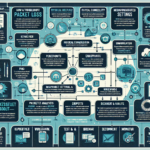
Start by confirming the symptom and narrowing the scope.
1. Verify Symptoms
Measure packet loss with ping, traceroute, or mtr between the two servers.
Check application behavior: look for delays, dropped connections, or data inconsistencies that correlate with the loss.
2. Analyze the Network Path
Check physical connections — cables, ports, and switch interfaces — for damage or loose seating.
Run traceroute or mtr to locate the hop where loss appears. Note latency spikes or consistent drops at specific hops.
Check for misconfigured firewalls or IDS/IPS devices that may be blocking or throttling traffic.
Monitor bandwidth utilization with nload, iftop, or your network monitoring dashboard to rule out congestion.
3. Examine Server Network Configuration
NIC settings: verify speed, duplex, and MTU on both ends. Mismatches cause loss.
Linux: ethtool <interface>; Windows: NIC properties in Device Manager or PowerShell.
Update NIC drivers to the latest stable version supported by your OS.
Offloading features: TSO, LSO, GRO, and checksum offload can sometimes corrupt packets under load. Disable them temporarily to test.
Linux example: ethtool -K <interface> tso off lso off gro off
4. Check Network Hardware
Inspect switches and routers for interface errors, control-plane CPU spikes, or faulty ports.
Pull error counters — CRC errors, frame drops, runts, giants — via CLI or management software.
Swap in known-good cables, switch ports, or NICs to isolate bad hardware.
5. Review Server Performance
CPU and memory pressure can stall packet processing. Check with top, htop, or Task Manager.
Disk I/O saturation may delay network stack work if the system is paging heavily. Use iostat -xz 1 or equivalent.
6. Inspect Network Policies
QoS: verify that priority queues and rate limits aren’t starving the affected traffic class.
VLANs: confirm tagging, trunk allowed lists, and inter-VLAN routing are correct. A missing VLAN on a trunk drops traffic silently.
7. Test Virtualization and Kubernetes Layers
Virtualized hosts: check vNIC driver type (virtio, vmxnet3, etc.), MTU inside the guest, and the hypervisor’s virtual switch configuration.
Kubernetes: validate the CNI plugin (Calico, Flannel, Cilium, etc.) and any NetworkPolicy objects. Pod-to-pod and pod-to-service connectivity should work without hairpin NAT issues.
Check pod logs for DNS timeouts, connection refused, or “no route to host” errors.
8. Investigate Storage Systems
If the traffic carries iSCSI, NFS, or SMB, verify the dedicated storage network: MTU (often 9000), flow control, and separate VLANs.
For Fibre Channel SANs, check fabric logs for zone mismatches, credit loss, or failing SFPs.
9. Monitor for Security Threats
DDoS: look for traffic spikes from unexpected sources or protocols. NetFlow/sFlow and IDS alerts help here.
Malware: compromised hosts generating outbound floods can saturate uplinks. Run endpoint scans if internal sources look suspicious.
10. Capture and Analyze Traffic
Packet captures: tcpdump -i <interface> -w capture.pcap -s 0 or Wireshark. Filter for retransmissions (tcp.analysis.retransmission), duplicate ACKs, and zero windows.
Correlate with device logs — switch port flaps, firewall denies, kernel ring buffer (dmesg -T).
11. Engage External Providers
If loss occurs beyond your demarc (WAN, cloud interconnect, ISP), open a ticket with the provider. Share mtr output, timestamps, and source/destination IPs.
12. Test and Validate Fixes
After any change — cable swap, config tweak, driver update — re-test with ping, iperf3 (TCP and UDP), and the actual application workload.
Preventive Measures
Continuous monitoring: alert on packet loss thresholds in Prometheus, Zabbix, PRTG, or Nagios.
Redundancy: dual-homed servers, ECMP or LACP uplinks, and diverse physical paths.
Periodic tuning: revisit MTU, offload settings, and queue depths after kernel or firmware upgrades.
Ali YAZICI is a Senior IT Infrastructure Manager with 15+ years of enterprise experience. While a recognized expert in datacenter architecture, multi-cloud environments, storage, and advanced data protection and Commvault automation , his current focus is on next-generation datacenter technologies, including NVIDIA GPU architecture, high-performance server virtualization, and implementing AI-driven tools. He shares his practical, hands-on experience and combination of his personal field notes and “Expert-Driven AI.” he use AI tools as an assistant to structure drafts, which he then heavily edit, fact-check, and infuse with my own practical experience, original screenshots , and “in-the-trenches” insights that only a human expert can provide.